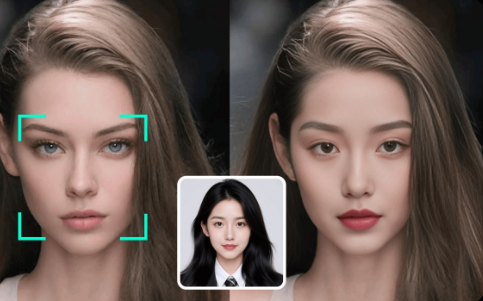
AI face swapping has evolved from a novelty feature into a serious content creation tool. After spending two weeks testing the leading platforms—from browser-based apps to professional-grade software—I’ve identified the tools that actually deliver on their promises.
Whether you’re creating viral social content, producing marketing materials, or building meme-worthy videos, the right face swap tool can save hours of post-production work. But with dozens of options flooding the market, most claiming “realistic results” and “professional quality,” knowing which tools actually perform is critical.
This guide cuts through the noise. I’ve tested these platforms with everything from static portraits to fast-motion videos, group photos to dynamic clips. I guarantee at least one of these tools will meet your needs.
Best AI Face Swap Tools at a Glance
| Tool | Best For | Platforms | Free Plan | Starting Price | Commercial Use |
| Magic Hour | Professional creators & marketers | Web, iOS, Android | Yes (400 credits) | $12/mo annual | Creator+ plans |
| Reface | Viral content & social media | iOS, Android | Yes (watermarked) | $3.99/mo | Paid plans only |
| DeepSwap | High-quality video swaps | Web | No | $9.99/mo | Yes |
| Vidwud | Free unlimited swaps | Web | Yes (unlimited) | Free | Yes |
| Pixlr | Quick browser-based edits | Web | Yes | Free | Yes |
| FaceMagic | TikTok-style short-form video | iOS, Android | Yes (limited) | $9.99/mo | Paid plans only |
| Swapface | Real-time live streaming | Windows, Mac | No | One-time purchase | Yes |
| PhotoDirector | Desktop photo editing suite | Windows, Mac | Yes (trial) | $54.99/year | Yes |
| Arting.ai | Long-form video processing | Web | Yes (unlimited) | Free | Yes |
| Remaker | Batch processing & GIFs | Web | Yes | $9.99/mo | Yes |
1. Magic Hour – Best Overall AI Face Swap Tool
Magic Hour’s face swap technology represents what professional-grade AI content creation looks like in 2026. After testing it alongside nearly a dozen competitors, it consistently delivered the most realistic, production-ready results.
What sets Magic Hour apart is its comprehensive approach. This isn’t just a face swap tool—it’s a complete content creation platform that combines face swapping with lip sync, animation, and video generation. You can swap faces in photos and videos, then immediately move to lip-syncing dialogue or animating the result.
The platform handles both images and videos with impressive precision. During testing, it maintained natural lighting adaptation across different angles, preserved subtle facial expressions during movement, and generated clean results even in challenging scenarios like side profiles or partially obscured faces.
Pros:
- Delivers consistently realistic swaps with proper lighting and texture matching
- Supports both photos and videos up to 4K resolution on Business plan
- Includes multiple face mapping for group videos
- Integrates with other AI tools (lip sync, animation, video-to-video) in one workflow
- No software installation required—fully browser-based
- Commercial use rights included on Creator plan and above
- Processes videos faster than most competitors (typically 1-3 minutes for 30-second clips)
- 400 free credits to start testing features
Cons:
- Free plan includes watermarks on exports
- Credit system requires monitoring usage on lower-tier plans
- Video processing times increase during peak hours
- Some advanced features locked behind Pro and Business tiers
After two weeks of intensive testing, I found Magic Hour face swap feature particularly strong for marketing and advertising use cases. The quality was consistent enough that I felt confident using swapped content in client projects—something I couldn’t say about most competitors.
One marketer I spoke with shared this perspective: “I’ve tested a lot of face swap apps, and most couldn’t handle movement or different angles. Magic Hour was the first tool that gave me clean, realistic swaps I felt confident using in ads. It saved hours of production time and the results actually performed.”
If you’re looking for a platform that delivers professional results without the learning curve of desktop software, Magic Hour hits the sweet spot.
Pricing:
- Free Plan: 400 credits, watermarked exports, 576px resolution, 200MB upload limit
- Creator Plan: $12/month (annual) or $15/month (monthly) – 120,000 credits/year, 1024px resolution, no watermark, 2GB uploads
- Pro Plan: $49/month – 600,000 credits/year, 1472px resolution, priority queue, 5GB uploads, commercial use
- Business Plan: $249/month – 3,000,000 credits/year, 4K resolution, API access, 10GB uploads, priority support
2. Reface – Best for Viral Content Creation
Reface built its reputation on entertainment-first face swapping, and it shows. With over 100 million downloads across 90+ countries, this mobile app prioritizes speed and shareability over technical perfection.
The app’s strength lies in its massive template library. You’ll find thousands of trending videos, memes, and animated clips updated daily. The interface is designed for impulse creativity—tap a template, upload your selfie, and you’re done in seconds.
Pros:
- Massive library of pre-made templates and trending content
- Extremely fast processing (typically 5-10 seconds)
- Regular content updates with viral trends
- Gender swap and age transformation effects
- AI singing feature that animates photos to music
- Available on both iOS and Android
Cons:
- Quality varies significantly between templates
- Free version heavily watermarked
- Aggressive upselling to premium features
- Results prioritize entertainment over photorealism
- Limited control over final output
- Some users report unexpected subscription charges
Reface works best for casual users creating shareable social content. During testing, newer templates showed better AI training than older ones, so stick to recently added options for best results.
The app occasionally struggles with non-frontal angles or complex lighting, but for straight-on selfies swapped into viral templates, it’s hard to beat the speed and convenience.
Pricing:
- Free Plan: Available with watermarks and limited templates
- Weekly: $2.49-$6.99 depending on promotion
- Annual: $24.99/year
- Note: Multiple users report confusing subscription practices—review carefully before purchasing
3. DeepSwap – Best for High-Quality Video Face Swapping
DeepSwap targets serious content creators who need professional-grade video results. Their proprietary AI model claims 90% face swap similarity—20% higher than open-source alternatives—and in testing, the quality difference was noticeable.
The platform handles complex scenarios better than most competitors. During testing, it maintained consistency across fast motion, multiple angles, and varying lighting conditions. The ability to swap up to 6 faces simultaneously in a single video is particularly useful for group scenes.
Pros:
- Superior video quality compared to most competitors
- Supports up to 6 simultaneous face swaps
- Handles GIFs, photos, and videos
- Additional AI tools (background removal, image enhancement)
- No software installation required
- Clear, intuitive interface
Cons:
- Credit-based pricing adds up quickly for regular use
- No free plan—trial credits only
- Processing times longer for high-quality outputs
- Quality drops noticeably with low-quality source footage
- Strict refund policy
DeepSwap uses a credit system rather than unlimited monthly access. Each edit consumes credits based on length and complexity. A 60-second video might use 15-20 credits, meaning the base $9.99 plan (20 credits) depletes fast with regular use.
For professionals creating high-stakes content—think advertising, film production, or branded content—the quality justifies the cost. For casual users, the pricing model feels restrictive.
Pricing:
- Starter: $9.99/month (20 credits)
- Premium: Varies based on credit packages
- Note: Each video swap consumes 10-30 credits depending on length
4. Vidwud – Best Free Unlimited Face Swap
Vidwud represents the democratization of face swap technology. This completely free, browser-based tool delivers 80-85% of the quality you’d get from paid platforms—without watermarks, usage limits, or subscription fees.
During testing, Vidwud surprised me. Results were sharp, detailed, and handled multi-person images competently. The platform supports photos, videos, and GIFs with no apparent processing limits.
Pros:
- Completely free with no hidden costs or watermarks
- Unlimited daily swaps
- Supports multiple face swaps in single image/video
- Fast processing (typically 30 seconds for images)
- No account required for basic use
- High-quality downloads (up to 1080p video, 4K photos)
Cons:
- Struggles with side profiles and extreme angles
- Processing times vary during peak usage
- Requires stable internet connection
- Less consistent quality compared to premium tools
- Limited customer support
The catch? Quality consistency. While many swaps look excellent, results can be hit-or-miss with challenging angles or lighting. The free model also means occasional wait times during high-traffic periods.
For budget-conscious creators willing to accept occasional imperfections, Vidwud offers remarkable value. I tested it against several paid alternatives and found the output quality competitive for straightforward face swaps.
Pricing:
- Free Plan: Unlimited use, no watermarks, full feature access
- Premium Options: Available for priority processing and advanced features
5. Pixlr – Best for Quick Browser-Based Swaps
Pixlr’s face swap tool integrates into their broader photo editing platform, offering a streamlined solution for users who need quick results without installing software.
The tool prioritizes speed and accessibility. You can upload photos, select faces, and download results in under a minute. The interface is clean and self-explanatory—perfect for users who just want the job done.
Pros:
- No software download required
- Fast processing speeds
- Integrates with full photo editing suite
- Template library for themed content
- Works on any device with a browser
- Free access to basic features
Cons:
- Limited to static images (no video support)
- Quality sometimes inconsistent
- Fewer advanced controls than specialized tools
- Occasional ads in free version
During testing, Pixlr worked best for simple, straightforward swaps—party invitations, social media posts, quick memes. It’s not built for professional production work, but for casual use cases, it gets the job done efficiently.
Pricing:
- Free Plan: Available with ads and basic features
- Premium: $7.99/month for advanced tools and ad-free experience
6. FaceMagic – Best for TikTok-Style Short-Form Video
FaceMagic targets the short-form video creator market with purpose-built templates for TikTok, Reels, and YouTube Shorts. The platform emphasizes speed and trend-alignment over photorealism.
The template library is the main draw. Pre-built scenes sync your face to music, dance moves, and lip-sync performances. You can upload multiple faces for group content, making it useful for collaborative videos.
Pros:
- Specialized templates for viral short-form content
- Fast rendering optimized for social media
- Multi-face support for group videos
- Expression mapping maintains facial movements
- Regular template updates following trends
Cons:
- Limited customization options
- Quality varies by template
- Subscription required for unlimited access
- Results sometimes look artificial
- Primarily mobile-focused
FaceMagic works best for creators pumping out daily content who prioritize volume over perfection. During testing, the best results came from using well-lit selfies with clear facial features.
Pricing:
- Free Plan: Limited templates and watermarked exports
- Monthly: $9.99/month for unlimited templates and no watermark
7. Swapface – Best for Real-Time Live Streaming
Swapface pioneered real-time face swapping for live streaming—a technical achievement that sets it apart from post-production tools. The software runs locally on your machine, swapping faces in real-time during video calls, streams, or recordings.
This desktop application requires a mid-range graphics card but delivers instant results. Popular with streamers, content creators doing live shows, and anyone needing on-the-fly face swapping.
Pros:
- Real-time processing for live applications
- Runs locally for privacy (all processing on your device)
- Works with streaming software and video calls
- No ongoing subscription fees
- Hyperrealistic results with proper source material
Cons:
- Requires decent GPU (mid-range or better)
- Desktop-only (Windows and Mac)
- Steeper learning curve than web tools
- One-time purchase cost
- Limited to real-time scenarios
During testing, Swapface impressed with zero-latency swapping during live feeds. Quality depends heavily on your hardware—better GPU means better results.
Pricing:
- One-time purchase: Pricing varies, typically around $99-149
- Available for Windows and Mac (Apple Silicon supported)
8. PhotoDirector – Best Desktop Photo Editing Suite
PhotoDirector integrates face swap functionality into a comprehensive photo editing platform. For users already working in the Cyberlink ecosystem, it provides professional-grade tools in a familiar interface.
The face swap feature uses advanced AI but sits within a broader editing workflow. You can swap faces, then immediately adjust lighting, apply filters, or make compositional changes.
Pros:
- Professional-grade editing tools alongside face swap
- One-time purchase or subscription options
- Extensive tutorial library
- Regular feature updates
- Includes animation and video editing capabilities
Cons:
- Desktop software requires installation
- Steeper learning curve than web tools
- Overkill for users only needing face swaps
- Windows-focused (Mac support limited)
PhotoDirector makes sense for photographers and designers who need face swapping as part of a broader editing workflow. If you’re only doing face swaps, simpler tools will serve you better.
Pricing:
- Subscription: Starting around $54.99/year
- One-time purchase: Available for specific versions
- Free trial available
9. Arting.ai – Best for Long-Form Video Processing
Arting.ai specializes in processing longer videos—a pain point for many face swap tools that struggle with extended content. The 2026 model improvements delivered better edge blending and motion consistency across lengthy clips.
The platform handles videos up to 300MB, maintaining quality throughout. During testing, it tracked faces reliably across scene changes and varying lighting conditions.
Pros:
- Optimized for long-duration videos
- Free unlimited processing
- No watermarks
- Handles complex motion tracking
- Regular AI model updates improving quality
Cons:
- Processing times increase significantly with video length
- Queue times during peak usage
- Less polished interface than competitors
- Limited editing controls
For creators working with longer content—tutorials, vlogs, narrative videos—Arting.ai solves a specific problem that most face swap tools ignore.
Pricing:
- Free Plan: Unlimited use, no watermarks
- Processing times may vary during peak periods
10. Remaker – Best for Batch Processing & GIFs
Remaker focuses on workflow efficiency with batch processing capabilities and specialized GIF tools. You can queue multiple images or videos, apply face swaps, and download everything at once.
The GIF face swap feature deserves special mention—it handles animated content better than most competitors, maintaining consistency across frames.
Pros:
- Batch processing for multiple files
- Specialized GIF face swap tools
- Video, photo, and GIF support
- Clean, straightforward interface
- Regular feature additions
Cons:
- Free version has significant limitations
- Processing quality inconsistent
- Customer support slow to respond
- Some features still in beta
Remaker works best for users managing high volumes of content who need efficient batch operations. Individual swap quality doesn’t match premium tools, but the workflow advantages compensate for many use cases.
Pricing:
- Free Plan: Basic features with limitations
- Premium: $9.99/month for full feature access
How We Chose These Tools
I spent two weeks testing 20+ face swap platforms to identify the tools actually worth using. Here’s how I evaluated them:
Testing Methodology: I used the same set of source materials across all platforms—front-facing portraits, side profiles, group photos, and videos with varying lighting and motion. This consistent baseline made quality differences immediately apparent.
Evaluation Criteria:
- Output Quality: Realism, texture matching, lighting adaptation, edge blending
- Processing Speed: Time from upload to download
- Reliability: Consistency across different source materials
- Ease of Use: Learning curve, interface clarity, workflow efficiency
- Value: Features relative to cost, hidden fees, usage limits
- Special Features: Multi-face support, video length, format compatibility
- Commercial Rights: License terms for business use
Real-World Testing: I didn’t just run technical tests—I used these tools for actual projects. Marketing materials, social content, meme creation, and client work. Tools that looked promising in isolation sometimes failed under production pressure.
Privacy & Ethics: I evaluated data handling practices, storage policies, and ethical safeguards. Tools with questionable privacy practices or lacking content usage guidelines scored lower.
The result: 10 tools that actually deliver on their promises, each with clear strengths for specific use cases.
The Face Swap Market Landscape
The AI face swap space has matured significantly since its meme-era origins. Several trends are reshaping the market in 2026:
- Open-Source Convergence: Most commercial tools now build on open-source foundations like FaceFusion and SimSwap. This means quality differences increasingly come from UI/UX, processing speed, and integrated features rather than core AI capability. The democratization benefits users—even free tools deliver impressive results.
- Real-Time Processing: Live face swapping, pioneered by Swapface, is expanding. Several competitors announced real-time features coming in 2026, transforming face swapping from post-production to live performance technology.
- Multi-Modal Integration: Tools like Magic Hour represent the future—platforms combining face swapping with lip sync, animation, and video generation in unified workflows. Single-purpose tools face pressure to expand or compete purely on specialized quality.
- Quality Plateau: The gap between premium and free tools has narrowed dramatically. Vidwud delivers 80-85% of premium tool quality at zero cost. This forces paid platforms to justify subscriptions through speed, support, and advanced features.
- Ethical Frameworks: 2025-2026 saw increased focus on responsible AI use. Leading platforms now include watermarking, usage disclaimers, and content verification tools. The industry is slowly maturing past its “anything goes” phase.
Emerging Tools Worth Watching:
- Banuba SDK: Powers face swap features in 200+ commercial apps
- JoggAI: Next-gen facial alignment for complex poses
- VidMage: Strong multi-face capabilities for group content
- Avatarify: Live facial animation for video calls
The market continues consolidating around a few dominant platforms while niche tools serve specialized needs. For users, this means more choice and better quality at every price point.
Final Takeaway
Choosing the right face swap tool depends on your specific needs:
- For professional creators and marketers: Magic Hour offers the best balance of quality, features, and workflow integration. The ability to swap faces, then immediately move to lip sync or animation, streamlines production significantly.
- For viral content and social media: Reface’s template library and speed make it ideal for high-volume social posting, despite occasional quality inconsistencies.
- For budget-conscious creators: Vidwud delivers impressive free results. While not perfect, it’s competitive with paid alternatives for many use cases.
- For video professionals: DeepSwap’s superior quality justifies the cost when output matters more than speed.
- For live streaming: Swapface remains the real-time leader, though hardware requirements limit accessibility.
- For quick, casual swaps: Pixlr’s browser-based simplicity gets straightforward jobs done fast.
My recommendation: Start with Magic Hour’s free 400 credits or try Vidwud’s unlimited free tier. Test your specific use cases—source material quality, lighting conditions, angles—before committing to paid plans. Most face swap tools have quirks and preferences that only reveal themselves through hands-on testing.
Remember that source material quality matters more than tool selection. Well-lit, front-facing photos with clear facial features produce better results across all platforms. Garbage in, garbage out applies to AI face swapping.
Finally, use these tools responsibly. Obtain consent when using recognizable faces, disclose AI use when appropriate, and avoid creating misleading or harmful content. The technology is powerful—wield it ethically.
Frequently Asked Questions
Can I use face-swapped content commercially?
It depends on the platform and your subscription tier. Magic Hour’s Creator plan and above explicitly allows commercial use. DeepSwap and Remaker support commercial projects on paid tiers. Free tools like Vidwud typically don’t restrict commercial use, but always verify specific terms. Reface and FaceMagic require paid subscriptions for commercial rights.
Is face swapping legal?
Face swapping is legal when used with consent and for legitimate purposes—entertainment, marketing, creative projects. Legal issues arise when used to deceive, defraud, or impersonate others maliciously. Always obtain permission when using recognizable faces. Never create non-consensual explicit content, engage in impersonation fraud, or spread misinformation.
How long does processing take?
Processing times vary significantly. Real-time tools like Swapface work instantly. Cloud platforms typically process 30-second clips in 1-3 minutes (Magic Hour averages 2 minutes, DeepSwap around 10 seconds for 1-minute clips, Vidwud 5-10 minutes). Times increase during peak usage and with longer videos. Priority queues on paid plans reduce wait times.
Do these tools work on mobile devices?
Most web-based tools (Magic Hour, DeepSwap, Vidwud, Pixlr) work in mobile browsers. Dedicated mobile apps include Reface and FaceMagic. Desktop-only tools like Swapface and PhotoDirector require computers with adequate processing power.
What makes a good source image for face swapping?
Best results come from well-lit, front-facing photos with clear facial features. Avoid harsh shadows, obstructions (glasses, hands), extreme angles, or blurry images. Both source and target faces should have similar lighting conditions. Higher resolution images generally produce better results.